


Acon Digital Restoration Suite 3 Upgrade from Restoration Suite 2
Upgrade to Restoration Suite 3 for registered owners of Restoration Suite 2. Restoration Suite 3 brings AI-powered noise and hum removal, refreshed DeClick and DeClip interfaces, and a new all-in-one plug-in that analyses your audio and sets up the right fixes automatically.
SKU 1537-1039
UpgradeThis is an upgrade, not the full version. You must own a registered license of Restoration Suite 2 to use it.
- Type
- Audio Restoration Software
- Formats
- VST, VST3, AU, AAX
- Mac
- OS X 10.13 or later
- Windows
- Windows 10 / 11
- Apple Silicon
- Native
 View →
Need help? Contact us.

Click the image to zoom in. Move to look around.
Overview
About Restoration Suite 3 Upgrade from Restoration Suite 2
Upgrade: This is an upgrade, not the full version. You must own a registered license of Restoration Suite 2 to use it.
Professional grade tools for noise, hum, click and clipping removal
Restoration Suite 3 brings AI-powered noise and hum removal, refreshed DeClick and DeClip interfaces, and a new all-in-one plug-in that analyses your audio and sets up the right fixes automatically. You get clean, transparent results for music and speech without capturing a noise profile.
Instant results. No guesswork. Just clean audio.
Restore your recordings to their original clarity with Restoration Suite 3: four professional-grade plug-ins, plus a new all-in-one plug-in, that remove noise, hum, clicks, and clipping without harming the sound you want to keep.
DeNoise 3 and DeHum 3 now use AI-based processing to remove hiss, broadband noise, hum, and buzz without needing a noise profile. DeClick 3 repairs clicks and crackles, and DeClip 3 reconstructs clipped peaks. Both have refreshed interfaces. The all-in-one plug-in combines all four: click Analyze, play your audio, and it adds the modules you need.
Use it to:
- Clean up hiss, hum, or buzz on instruments, vocals, and dialogue
- Restore vinyl, cassette, or archival tape transfers
- Repair clipped or overloaded recordings without re-recording
- Even out inconsistent noise floors across takes
What's included in the package
Restoration Suite 3 Plug-in
Not sure which tool your audio needs? Our new Restoration Suite 3 Plug-in takes the guesswork out of audio repair, just click Analyze and play a few seconds of your recording. We can then work out exactly what's wrong and recommend the right tool(s) for the job. There's no trial and error and no stacking plug-ins in the hope of getting it right, just a solid result in seconds that you can fine-tune at any time.
Whether you're cleaning up dialogue, podcasts, music or archival recordings, Restoration Suite 3 Plug-in gets you from problem audio to production-ready sound in a fraction of the time.
DeNoise 3
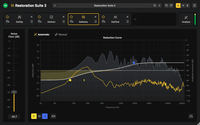
Noise reduction usually means capturing noise profiles, guessing at settings and trading noise for artefacts. DeNoise 3 takes the guesswork out of removing hiss, wind noise, buzz and camera noise. Its new machine learning–powered Automatic mode cleans up audio in seconds with no noise profile needed, and the results stay transparent and true to the original recording. For complex or unusual noise, Manual mode gives you full control.
Whether you're working on dialogue, music, podcasts or archival recordings, you can remove as much or as little noise as you need while keeping the sound natural. Stereo images stay intact, and you can listen to exactly what's being removed.
DeHum 3
Hum and buzz from poorly grounded equipment or electrical motors can ruin a recording, and removing them usually means hunting for frequencies and harmonics and putting up with filter artefacts. DeHum 3's new machine learning–powered Automatic mode detects and removes hum for you, with no guesswork. Precision mode gives you more control and follows hum that drifts in pitch, while Notch mode offers a low-CPU, zero-latency option.
From location dialogue to guitar, bass and archival recordings, DeHum 3 removes hum transparently and keeps the sound natural. Stereo images stay intact, and you can listen to exactly what's being removed.
DeClick 3
Clicks, pops and crackle spoil vinyl and 78 RPM transfers, digital recordings suffer from drop-outs, and plosives can ruin a great vocal take. DeClick 3 fixes them all in one plug-in, removing clicks, pops, surface crackle and thumps from P and B sounds or scratched records. It rebuilds damaged audio from the clean signal around it, so the music or voice underneath stays intact, and a streamlined interface makes the results quicker to hear and see.
From record collections to archival recordings and vocals, DeClick 3 restores a clean, natural sound without dulling the original. Stereo material is handled transparently, and you can listen to exactly what's being removed.
DeClip 3
A level set too hot or an overdriven preamp can leave harsh, flattened peaks that distort dialogue and music, and often there's no chance to record again. DeClip 3 restores audio damaged by analogue or digital clipping, rebuilding the missing peaks from the undistorted audio around them so the original tone and frequency balance are kept. One click detects the clipping level, and a clear level histogram shows exactly what will be restored, so you get great results without guesswork.
From interviews recorded too loud to live and archival recordings, DeClip 3 turns distorted takes into natural-sounding audio. You can add headroom for the restored peaks and trade processing load against quality when needed.
Platforms and Plug-in Formats
- Available as VST, VST3 or AAX plug-ins on PC (Windows)
- Available as VST, VST3, AAX or AU plug-ins on Apple Macintosh (OS X)
- Supports sampling rates up to 192 kHz
- Supports surround and immersive multi-channel audio up to 7.1.6 channels
Restoration Suite 3 Upgrade from Restoration Suite 2 Tech Specs
Mac
- Operating system
- OS X 10.13 or later
- Processor
- Runs natively on ARM64 and Intel
- Memory
- 1 GB RAM (4 GB or more recommended)
- Disk
- 1 GB free HD space
- Host
- A host application that is compatible with AU, VST, VST3 or AAX (Pro Tools 12.8.3 or higher)
Windows
- Operating system
- Windows 10 / 11
- Processor
- Intel Core i5 or AMD multi-core processor (Intel Core i7 or faster recommended)
- Display
- 1366 x 768 display resolution (1920 x 1080 or higher recommended)
- Memory
- 1 GB RAM (4 GB or more recommended)
- Disk
- 1 GB free HD space
- Host
- A host application that is compatible with VST, VST3 or AAX (Pro Tools 12 or higher)
Keep exploring
You may also like
Recently viewed
Questions before you buy?
We can help with compatibility, licensing and delivery.